
How to Print Original JAMB Result Slip in Nigeria (Step-by-Step Guide)
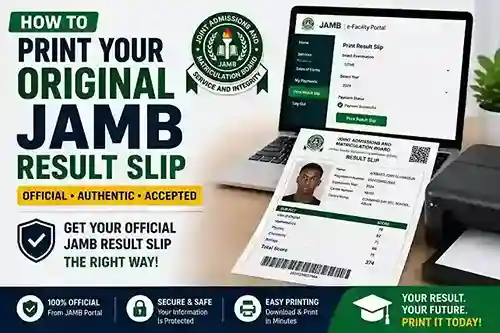
How to Print Your Original JAMB Result Slip in Nigeria: Complete Step-by-Step Guide
Introduction
The Joint Admissions and Matriculation Board (JAMB) result slip is one of the most important documents for students seeking admission into Nigerian universities, polytechnics, colleges of education, and other tertiary institutions. While many candidates check their UTME scores through SMS or the JAMB portal, institutions often require the original JAMB result slip for admission processing, screening exercises, and documentation.
Unlike the simple result notification displayed after checking your score, the original JAMB result slip contains your passport photograph, examination details, registration number, and official result information. Because of its authenticity, it is widely accepted for official purposes.
Many candidates are unsure about the correct procedure for printing their original JAMB result slip. This guide explains everything you need to know, including requirements, costs, benefits, and common issues you may encounter.
What Is the Original JAMB Result Slip?
The original JAMB result slip is the official version of your Unified Tertiary Matriculation Examination (UTME) result issued by JAMB.
It contains:
- Candidate's full name
- JAMB registration number
- Passport photograph
- Examination year
- Institution choices
- Course choices
- Subject combination
- UTME scores
- Total score
Because it includes your photograph and official details, it serves as a valid proof of your JAMB examination performance.
Why Is the Original JAMB Result Slip Important?
Many candidates assume that checking their score online is enough. However, the original result slip is often required for important academic processes.
Admission Screening
Most institutions require the original result slip during Post-UTME screening and admission verification.
Clearance and Registration
Admitted students may be required to submit their original JAMB result slip during departmental and faculty clearance.
Scholarship Applications
Some scholarship organizations request official examination documents during application processes.
Personal Record Keeping
Maintaining copies of important academic documents is always advisable.
Difference Between JAMB Score Notification and Original Result Slip
Many students confuse these two documents.
JAMB Score Notification
- Displays basic score information.
- Can be accessed through SMS or portal checks.
- Does not contain a passport photograph.
- Often not accepted for official admission purposes.
Original JAMB Result Slip
- Contains passport photograph.
- Includes complete examination details.
- Accepted by institutions and organizations.
- Officially generated through JAMB services.
Requirements for Printing Original JAMB Result Slip
Before starting the process, ensure you have the following:
JAMB Registration Number
You will need the registration number used during UTME registration.
JAMB Profile Account
Candidates must have access to their JAMB profile account.
Email Address
The email linked to your JAMB profile may be required for login.
Internet Access
A stable internet connection helps ensure a smooth process.
Payment Method
Printing the original result slip usually requires payment through approved JAMB channels.
Step-by-Step Guide to Print Original JAMB Result Slip
Step 1: Visit the JAMB Portal
Go to the official JAMB website.
Navigate to the JAMB e-Facility portal.
Step 2: Log In to Your Profile
Enter:
- Email address
- Password
Use the credentials associated with your JAMB registration.
Step 3: Access the Result Slip Printing Service
After logging in:
- Locate available services.
- Select "Print Result Slip."
You may see additional instructions regarding payment requirements.
Step 4: Make Payment
JAMB charges a fee for printing the original result slip. Usually 1500
Follow the payment instructions carefully.
Payment options may include:
- ATM card
- Online banking
- Remita payment system
Always verify the current fee directly on the official JAMB portal before making payment.
Dm Dynamic Pro to get yours printed
Step 5: Confirm Payment
Once payment is successful:
- Return to the portal.
- Confirm transaction status.
- Continue with result slip generation.
Step 6: Print Your Original Result Slip
After confirmation:
- Your result slip becomes available.
- Download the PDF version.
- Print using a quality printer.
It is advisable to print multiple copies for future use.
How to Save Your JAMB Result Slip as PDF
Many candidates prefer keeping digital copies.
To save as PDF:
- Select Print.
- Choose "Save as PDF."
- Save the file on your device.
- Create backup copies.
Keeping digital copies helps prevent document loss.
Common Problems and Solutions
Forgotten Password
If you cannot remember your password:
- Use the password recovery option.
- Follow the reset instructions sent to your registered email.
Incorrect Login Details
Ensure:
- Your email address is correct.
- Password spelling is accurate.
- Caps Lock is not enabled accidentally.
Payment Issues
If payment is unsuccessful:
- Verify transaction status.
- Contact your bank if funds were deducted without service activation.
- Use official payment channels only.
Portal Downtime
During peak admission periods, the portal may become slow.
Try:
- Accessing the portal during off-peak hours.
- Using a stable internet connection.
- Refreshing your browser.
Missing Result Slip
If your result slip is unavailable:
- Verify your registration details.
- Contact JAMB support if necessary.
Benefits of Printing Multiple Copies
Many students print only one copy of their result slip.
It is safer to print several copies because you may need them for:
- Admission screening
- Clearance procedures
- Scholarship applications
- Future educational opportunities
Multiple copies can save time and money later.
Security Tips
Protect your personal information by following these guidelines:
Use Official JAMB Platforms
Avoid unofficial websites claiming to offer JAMB services.
Keep Your Login Credentials Secure
Do not share your password with others.
Save Backup Copies
Store digital copies on:
- Cloud storage
- Flash drives
- Personal computers
Verify Printed Information
Ensure all details on the result slip are accurate before submission.
Frequently Asked Questions
Can I Print My Original JAMB Result Slip Online?
Yes. Candidates can print their original JAMB result slips through the official JAMB e-Facility portal after completing the required payment.
Is the Original JAMB Result Slip Different from the Score Notification?
Yes. The original result slip contains your passport photograph and additional official details.
How Many Copies Should I Print?
Printing at least two or three copies is recommended.
Can Cyber Cafés Print It for Me?
Yes. Many accredited cyber cafés offer JAMB-related services. However, ensure they use the official JAMB portal.
Is the Original Result Slip Required for Admission?
Most institutions request it during admission processing and screening exercises.
Mistakes to Avoid
Using Unofficial Websites
Only use the official JAMB platform.
Waiting Until the Last Minute
Admission deadlines can create heavy portal traffic. Print your result slip early.
Ignoring Backup Copies
Always keep both physical and digital copies.
Sharing Sensitive Information
Protect your registration details and login credentials.
Conclusion
Printing your original JAMB result slip is an important step for every UTME candidate. Whether you are applying for admission, participating in screening exercises, or preparing for clearance, the original result slip serves as an official record of your examination performance.
The process is straightforward when you follow the correct steps through the official JAMB portal. By ensuring your details are accurate, making payments through approved channels, and keeping multiple copies for future use, you can avoid unnecessary stress during the admission process.
Remember, your original JAMB result slip is more than just a score sheet—it is an essential academic document that may be required throughout your educational journey.

About the Author:
Femi Victor(Techland Dynamic) is an experienced EdTech consultant and web developer with over 10 years of experience in creating digital learning tools for Nigerian schools. He is passionate about simplifying complex educational data and helping students navigate the admission process.



Comments
No comments yet.